
Build a Trade Assurance checklist Accio Skill (2026)
trade-assurance-checklist (YAML name: alibaba-trade-assurance) against lead time, quality spec, shipping. This pack is not an enable button and not a chargeback runner. Fees, coverage, and win-rates go to tradeassurance.alibaba.com. Off-platform payment is refused. Chargebacks hand off to K11. First-order steps: first Trade Assurance bulk order.
Contents
1. Why Trade Assurance needs its own Skill
Sales often write “the store has TA” as if this lot is already covered, or quote a fee from memory. The weekly pack (K07) only copies the visible Trade dimension. The RFQ pack (K06) must finish this three-piece check before it writes “suggest TA.” Sample follow-up (K09) does not write TA clause detail.
Seller Blog says Enable Trade Assurance and upload real certificates; inquiries can share real certificates within 24 hours. That is enable-and-share advice, not a fee SLA and not a conversion promise. Once a quote is given, price is owned; after agreement, no unilateral change of price or lead time—see Quality quotations win quality deals.
New to Skills? Start with K01. Hub: Accio Tutorials.
2. Download trade-assurance-checklist
Skill package
/downloads/accio-skills/trade-assurance-checklist.zip (~13 KB)
After unzip you should see trade-assurance-checklist/SKILL.md. Avoid nested zip shells—see K01.
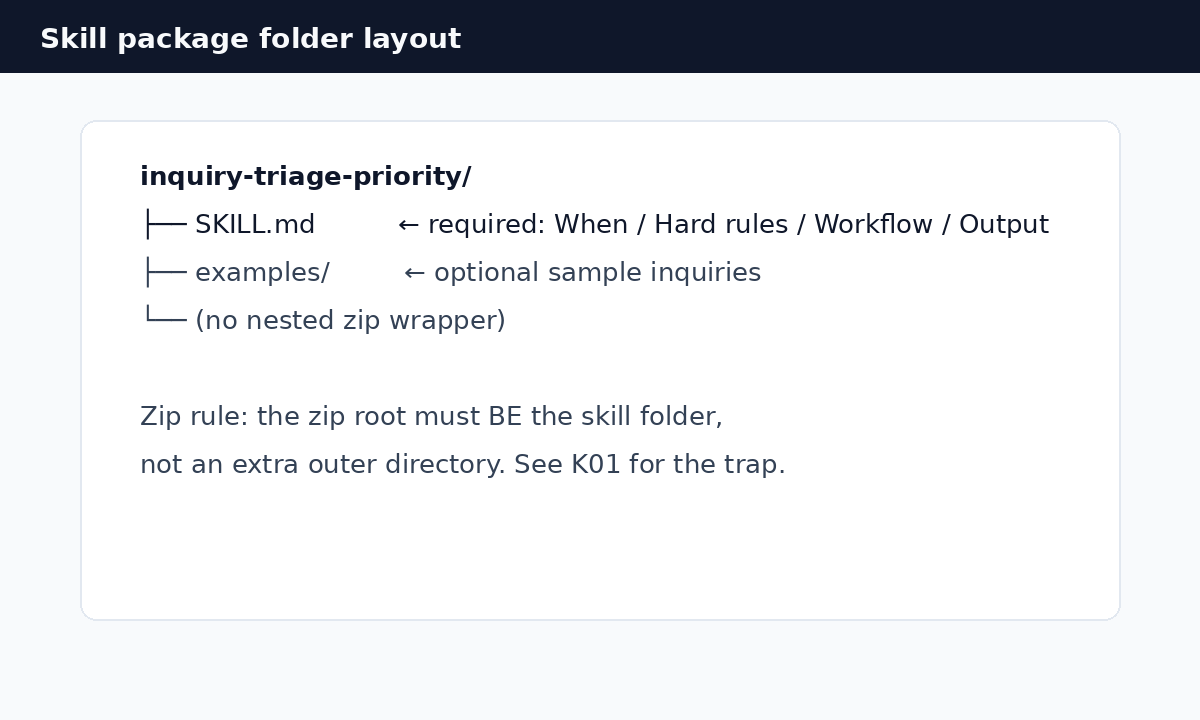
YAML name: alibaba-trade-assurance. Confirm the team accepts: no invented fees, no enable-on-behalf, no off-platform, chargeback handoff only.
3. The three-piece check
| Cell | Must be deliverable and written into the outgoing terms | If it fails |
|---|---|---|
| lead time | Confirmed in master data or by planning, with a start point | Stop. Do not shorten to win the order |
| quality spec | Model, material, tolerance, packing, cert scope match the files | Mark missing. Do not write “deliverable” |
| shipping | Incoterm, destination, mode, and who books are authorized | Unknown freight → exclude or pause |
“Deliverable” needs a source. If diagnosis is not GGS or it fails, ta_status=unseen—do not invent Trade GMV. Quota shortfalls are not something this pack can raise; see TA quota.
4. Enable advice, fees, and human gates
Already enabled: write that in the summary, enable_ta_gate=already_enabled, do not nag. Not enabled: recommend enable and upload real certificates, enable_ta_gate=pending; the user clicks enable. Asked about fees: give the official TA page. Without fee_copied_from_official_page, English drafts must not write percentage fees.
If a buyer asks whether you have Trade Assurance, the three English lines in SKILL.md only state the store-visible status. They do not guess coverage.
5. Off-platform and agreed terms
Moving a TA order offline, to a private account, or closing TA to dodge protection: status=stop, refused_off_platform=true. Price, lead time, or spec changes need written agreement from both sides; otherwise price_change_gate=blocked. Goods funds go to the store-bound corporate account. Membership still wires to ALIBABA.COM HONG KONG LIMITED. This pack does not write collection instructions.
6. Chargeback is a handoff only
This pack does not run the appeal. With an order number, hand off to alibaba-chargeback-appeal-assistant; orderId must be a string. Do not invent workctl ta or enable commands. Evidence structure: chargeback encyclopedia and K11. Shipping proof: shipping proof.
7. Upload and dry-run
- Zip per K01; upload under Capabilities → Skills (or the current client label);
- Attach to a fulfillment / quotation Agent, not a sourcing-only Agent;
- Dry-run: complete triple → accept; missing lead time → STOP; off-platform → stop; fee question → official URL only; chargeback → handoff with string orderId;
- UI follows the current client. The figure below is the K01 upload sketch.
Use alibaba-trade-assurance on this order request.
Check lead time, quality spec, shipping from my master data only.
Do not invent TA fees or win-rates. Do not enable TA. Do not send.
If the buyer asks to pay off-platform, refuse. send_gate=pending.
8. FAQ
Will this Skill enable Trade Assurance or pay on our behalf?
No. It does not click enable, pay, or change orders. The store enables TA in the backend.
Can the model quote a Trade Assurance fee rate?
No. Point to the official TA page and the current Seller Central TA page. No copied sentence, no percentages.
The buyer wants a private account to skip Trade Assurance. What then?
Stop and mark refused off-platform. Do not draft off-site payment steps.
Does this pack run the chargeback itself?
No. Hand off to K11. orderId as a string.