
What is an Accio Work Skill? How to Build & Upload Custom Skill Packages (2026)
Core Principle: An Accio Work Skill is an uploadable SOP package. At its core is a SKILL.md file specifying when to trigger, non-negotiable hard rules, step-by-step workflows, and output templates. Packaged as a clean ZIP, it is installed via Capabilities → Skills and assigned to target Agents. Skills govern draft quality and disciplinary guardrails; pricing, contracts, tariffs, and orders always remain under human approval.
Table of Contents
- What is a Skill: Package + SKILL.md, Not Another Sourcing Page
- Boundaries: Skill vs Plugin vs Web Accio vs Business Assistant
- Folder Architecture & 4 Core Sections of SKILL.md
- How to Package ZIP Correctly: The Root Directory Trap
- Upload Path: Capabilities → Skills (Subject to Client UI)
- Assigning to Agents & High-Quality When-to-Use Descriptions
- Three Downloadable Starter Packages & Validation Checklist
- Common Upload Failures & Troubleshooting SOP
- Executive Roadmap: Which Skill to Build First
- Half-Day Team Implementation Script
- Bad vs Good Description Examples
- Security & Data Red Lines
- Credits, Versions, and Toolkit Synergy
- FAQ & Sibling Reading
1. What is a Skill: Package + SKILL.md, Not Another Sourcing Page
When enterprise managers first encounter Accio Work Skills, they often mistake them for "another search web page" or an "auto-closing trading bot." More accurately: a Skill is a version-controlled operational package for desktop AI Agents. At minimum, it contains a Markdown specification (usually named SKILL.md) accompanied by optional templates, checklists, or reference samples.
Unlike conversational product search on web Accio, a Skill does not browse random factories; it hardens proven internal company standards. And unlike Sourcing Toolkit, which provides system integration with Alibaba.com, a Skill acts as a job role handbook assigned to an Agent.
Corpable's golden rule for B2B teams: Skills produce reviewable drafts, never unapproved external commitments. All prices, delivery lead times, certifications, and DDP terms must receive human sign-off.
2. Boundaries: Skill vs Plugin vs Web Accio vs Business Assistant
To avoid conceptual overlap across executive and technical teams, the matrix below outlines core responsibilities:
| Layer / Tool | Form & Medium | Core Purpose & Output | Red Lines & Misconceptions |
|---|---|---|---|
| Accio Work Skill (This Guide) | Offline packaged .zip (with SKILL.md) |
Desktop Agent Role SOP Handbook; outputs structured drafts (inquiry 4-factor checks, listing audits) | Drafts only; humans confirm pricing; never auto-orders or invents tax rates |
| Plugin (Sourcing Toolkit) | Client Plugin Channel official extension | System Bridge; connects Alibaba.com account for cross-platform outreach and quotation tracking | Does not set business criteria; without disciplined skills, automation multiplies chaos |
| Web / App Accio | Browser Web / Mobile SaaS interface | Discovery & Shortlisting; search global marketplace, compare specs, identify supplier shortlists | Not an internal rule package; possesses no access to company private pricing floors |
| Store Business Assistant | Alibaba.com merchant portal built-in tool | Seller Side Operations; store health diagnostics, smart product listing, P4P ad creatives | Platform seller infrastructure; do not confuse with desktop buyer/agent skills |
3. Folder Architecture & 4 Core Sections of SKILL.md
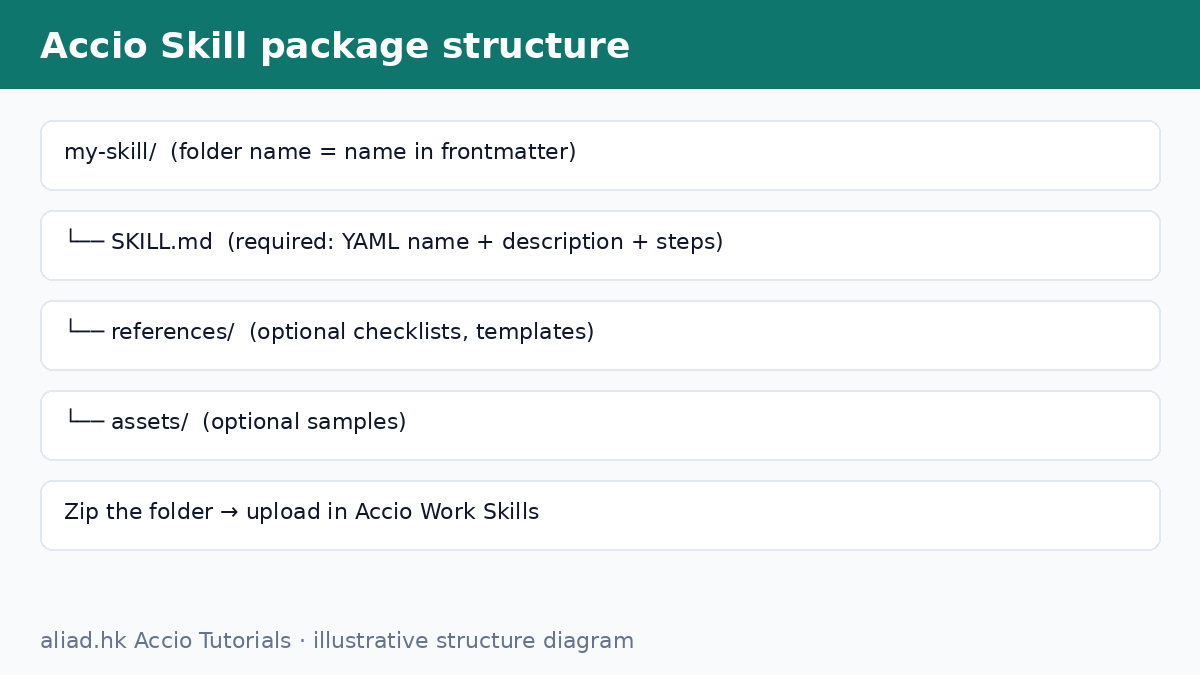
The minimal uploadable package requires a folder named after your skill identifier containing SKILL.md. Structure SKILL.md into 4 disciplined sections:
- YAML Header (name + description): Kebab-case name; description specifies exact triggers.
- When: Precise business scenarios when the skill should and should NOT be activated.
- Hard Rules: Non-negotiable red lines—no fabricated prices, no unverified certifications, human approval required.
- Workflow + Output Template: Numbered steps and standardized headers ready for CRM or chat dispatch.
4. How to Package ZIP Correctly: The Root Directory Trap
Over 80% of installation failures stem from packaging errors. Compress the skill folder directly from its parent directory so that SKILL.md is visible immediately inside the root directory upon extraction. Never wrap the package inside extraneous folders or include macOS __MACOSX metadata.
5. Upload Path: Capabilities → Skills
Navigate in the Accio Work desktop client to Capabilities → Skills and select Import / Upload ZIP. Verify that menu labels align with your client version.
6. Assigning to Agents & When-to-Use Descriptions
Assign dedicated skills to specialized Agents rather than bundling conflicting rules into a single monolithic assistant. Verify that the description includes actionable verbs, clear trigger objects, and explicit negative constraints.
7. Three Downloadable Starter Packages
Download Starter Skill ZIPs
- inquiry-reply-four-factors.zip · 4-Factor Inquiry Reply Skill
- listing-structured-selfcheck.zip · Structured Listing Audit Skill
- hs-logistics-quote-check.zip · HS Code & Logistics Quote Skill
8. Common Upload Failures & Troubleshooting SOP
- Failure A: ZIP wrapped in extra outer folder; SKILL.md not found in root.
- Failure B: Uploaded but not assigned to executing Agent.
- Failure C: Vague marketing description prevents Agent trigger matching.
- Failure D: Missing Hard Rules cause Agent hallucination on lead times and tariffs.
- Failure E: Confusing Skill with Sourcing Toolkit plugin.
9. Executive Roadmap: Which Skill to Build First
For lean trade teams, follow the priority order: First, Inquiry 4-Factor Reply to stop inquiry leakage; second, Listing Audit to protect AI search indexing; third, HS/Logistics Guardrails to prevent DDP contract disputes.
10. Half-Day Team Implementation Script
Designate an experienced sales lead to draft hard rules on paper in the morning, convert them into Markdown, test the ZIP upload before lunch, and refine trigger gaps during afternoon real inquiry trials.
11. Bad vs Good Description Examples
Bad: "Intelligently empowers B2B communication with high emotional quotient." (No trigger, no boundaries)
Good: "Use when drafting or reviewing Alibaba.com inquiries and RFQs. Enforces 4-factor gap analysis (usage, quantity, budget, certs); forbids inventing prices, lead times, or stock; requires human sign-off before dispatch."
12. Security & Data Red Lines
Never bundle full customer databases, unreleased mold blueprints, or internal cost price sheets into skill ZIPs. Supply deal context via live prompt inputs rather than static package embedding.
13. Credits, Versions, and Toolkit Synergy
Conserve Accio Work compute points by binding only relevant skills per task and specifying concise output formats. Pair skills with Sourcing Toolkit only after communication guardrails are firmly locked.
14. FAQ & Sibling Reading
What exactly is an Accio Work Skill?
An uploadable SOP package containing a SKILL.md file that defines trigger criteria, non-negotiable rules, workflows, and response templates for desktop AI Agents.
What is the difference between Skill and Plugin?
Plugins handle system connectivity with Alibaba.com; Skills define operational criteria and compliance guardrails for the Agent.